
Collection: Dell PowerEdge R830 SSD Upgrade

Dell PowerEdge R830 Solid State Drive Upgrades
Improve the performance of your Dell PowerEdge R830 Server with an Enterprise SSD upgrade. Switching to an SSD is one of the best ways to improve the speed of your server. SSDs allow for shorter boot times, faster data transfers, and higher bandwidth. All of these perks, bring a major advantage into enterprise environments.
We have Used and New Enterprise SSDs in stock for your PowerEdge R830 server. If you have any questions, please reach out to Sales@CloudNinjas.com.
Please note, that all SSDs are compatible with Dell systems, but are not Dell branded!
Dell PowerEdge R830 Solid State Drive Quick Specs
- Types: SAS, SATA.
- Speeds: 3GB/s, 6GB/s,
12GB/s, 24GB/s. - Max SATA speed: 6GB/s.
- Max SAS speed: 12GB/s.
- Sizes: 240GB to 7.68TB.
- Max Capacity: 7.68TB
(10x 7.68TB).
Contact Cloud Ninjas today to help compare your options
View the Dell PowerEdge R830 Technical Guide.
Dell PowerEdge R830 Solid State Drive Configuration Guide
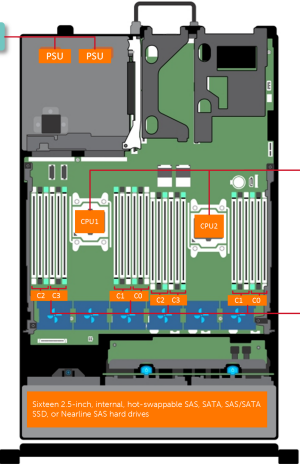 The R830 is a Quad Intel Processor server with possibilities for 8x 2.5" SAS/SATA or 16x 2.5" SAS/SATA Solid State Drives.
The Dell PowerEdge R830 supports 3 types of SSDs: SATA and SAS SSDs, which can range from sizes 240 GB to 7.68 TB and speeds from 3GB/s, 6GB/s to 12GB/s, depending on whether you, the consumer choose SAS or SATA SSDs.
Maximum capacity the R830 can offer physically is 16x 7.68TB SSDs.
If you want to maximize the capabilities of the Dell PowerEdge R830, choose one type of Solid State Drives to maintain consistency when running your server.
Cloud Ninjas offers a variety of SSD types that work perfectly with the Dell PowerEdge R830 server, select your preferred storage type and size from our page in the list of products below. Size truly depends on your application and size of data you the consumer store and use daily.
Contact our ninjas if you need any help picking out your SSD upgrade.
Cloud Ninja's Dell PowerEdge R830 Solid State Drive Upgrade Tips
- There are 2 different types of SSDs: SAS, SATA.
- There are multiple SSD sizes: 240GB, 256GB, 480GB, 500GB, 512GB, 800GB, 960GB, 1TB, 1.6TB, 1.92TB, 2TB, 3.2TB, 3.84TB, 6.4TB, 7.68TB.
- Maximum total sizes for SAS, SATA is 7.68GB of storage memory.
- Speed of drives range from: 3GB/s, 6GB/s, 12GB/s.
- The R830 supports SAS with speed of 24GB/s, but this speeds will clockdown to 12GB/s.
- There are 4 types of R830 chassis from a storage perspective: 8 Bay SFF, and 16 Bay SFF Hot-swap chassi.
- You can mix SSD types; however, it is advised that consumer chooses one type of SSD for the entirity of the servers SSD capabilities, in order to maintain consistency.
Dell PowerEdge R830 SSD Video Guide
Delivery Schedule

Dell PowerEdge R830 Solid State Drive QA
- What Solid State Drive sizes are compatible with the Dell PowerEdge R830 server? 240GB, 256GB, 480GB, 500GB, 512GB, 800GB, 960GB, 1TB, 1.6TB, 1.92TB, 2TB, 3.2TB, 3.84TB, 6.4TB, 7.68TB.
- What SSD speeds are supported by Dell R830 server? Speeds are, 3GB/s, 6GB/s, 12GB/s. 24GB/s SAS drives are supported but will clock down their speeds to 12GB/s.
- What types of SSDs are compatible with the R830? SAS and SATA Solid State Drives.
- What is a SAS SSD and is it supported by the R830? SAS is a NAND flash-based storage/caching device with purpose of fitting in the same slot as an HDD and use its SAS interface to connect to the host device. This type of solid state drive is supported by the R830.
- What is a SATA SSD and is it supported by the R830? Lowest grade of SSDs available in terms of performance and use the same interface as an HDD. This type of solid state drive is supported by the R830.
- What is the maximum SSD capacity for Dell R830 server? Maximum SSD capacity is 7.68TB in SATA and SAS SSD types
- Where can I order SSDs storage for my Dell PowerEdge R830 server? Order your SSD upgrades right here on this page by finding and selecting the SSD kit that is right for you. If you prefer another method, then please reach out to our sales team at sales@cloudninjas.com . We are here to help.
- How soon will my R830 SSD arrive? Orders placed before 8 am are set for same day processing and shipping. Delivery times vary based on carrier and location.
- What is the warranty on SSDs for the R830 server? Cloud Ninjas offers a one-year warranty on fully tested, refurbished SSD storage.
New Enterprise SATA SSDs
-
User Favorite
 Key Specs
- 960GB
- SATA
- New Drive
- 11th/12th/13th Gen Dell Servers
- Optional 3.5"/2.5" Drive Trays
$1,350.00In Stock -
Best Seller
 Key Specs
- 1.92TB
- SATA
- New Drive
- 6GB/s Transfer Speeds
- 11th/12th/13th Gen Dell Servers
- 2.5-inch Drive
- Optional 2.5/3.5-inch Drive Tray
$2,250.00In Stock -
Ideal for AI
 Key Specs
- 3.84TB
- SATA
- New Drive
- 6GB/s Transfer Speeds
- 11th/12th/13th Gen Dell Servers
- 2.5-inch Drive
- Optional 2.5/3.5-inch Drive Tray
$3,250.00In Stock -
Datacenter Favorite
 Key Specs
- 7.68TB
- SATA
- New Drive
- 6GB/s Transfer Speeds
- 11th/12th/13th Gen Dell Servers
- 2.5-inch Drive
- Optional 2.5/3.5-inch Drive Tray
$4,500.00In Stock


New Enterprise SAS SSDs
-
SAS Integration
 Key Specs
- 960GB
- SAS
- New Drive
- 12GB/s Transfer Speeds
- 11th/12th/13th Gen Dell Servers
- 2.5-inch Drive
- Optional 2.5/3.5-inch Drive Tray
- 1 DWPD
$1,900.00In Stock -
Datacenter Popular
 Key Specs
- 1.92TB
- SAS
- New Drive
- 12GB/s Transfer Speeds
- 11th/12th/13th Gen Dell Servers
- 2.5-inch Drive
- Optional 2.5/3.5-inch Drive Tray
- 1 DWPD
$2,900.00In Stock -
Future Proof
 Key Specs
- 1.6TB
- SAS
- New Drive
- 24GB/s Transfer Speeds
- 11th/12th/13th Gen Dell Servers
- 2.5-inch Drive
- Optional 2.5/3.5-inch Drive Tray
- 3 DWPD
$2,900.00In Stock -
RAID Optimized
 Key Specs
- 1.92TB
- SAS
- New Drive
- 24GB/s Transfer Speeds
- 11th/12th/13th Gen Dell Servers
- 2.5-inch Drive
- Optional 2.5/3.5-inch Drive Tray
- 1 DWPD
$2,900.00In Stock -
Hyperscale Optmized
 Key Specs
- 3.2TB
- SAS
- New Drive
- 24GB/s Transfer Speeds
- 11th/12th/13th Gen Dell Servers
- 2.5-inch Drive
- Optional 2.5/3.5-inch Drive Tray
- 3 DWPD
$3,900.00Out of Stock -
Enterprise RAID
 Key Specs
- 3.84TB
- SAS
- New Drive
- 12GB/s Transfer Speeds
- 11th/12th/13th Gen Dell Servers
- 2.5-inch Drive
- Optional 2.5/3.5-inch Drive Tray
- 1 DWPD
$4,495.00In Stock -
HPC Optimized
 Key Specs
- 3.84TB
- SAS
- New Drive
- 24GB/s Transfer Speeds
- 1th/12th/13th Gen Dell Servers
- 2.5-inch Drive
- Optional 2.5/3.5-inch Drive Tray
- 1 DWPD
$4,495.00In Stock -
Enterprise Grade
 Key Specs
- 6.4TB
- SAS
- New Drive
- 24GB/s Transfer Speeds
- 11th/12th/13th Gen Dell Servers
- 2.5-inch Drive
- Optional 2.5/3.5-inch Drive Tray
- 3 DWPD
$4,900.00In Stock -
Performance Storage
 Key Specs
- 7.68TB
- SAS
- New Drive
- 12GB/s Transfer Speeds
- 11th/12th/13th Gen Dell Servers
- 2.5-inch Drive
- Optional 2.5/3.5-inch Drive Tray
- 1 DWPD
$6,499.00In Stock -
Premium Storage
 Key Specs
- 7.68TB
- SAS
- New Drive
- 24GB/s Transfer Speeds
- 11th/12th/13th Gen Dell Servers
- 2.5-inch Drive
- Optional 2.5/3.5-inch Drive Tray
- 1 DWPD
$6,499.00In Stock


New Consumer SATA SSDs
-
 Key Specs
- 500GB
- 6GB/s SATA
- 2.5-inch Drive
- 11th/12th/13th Gen Dell Servers
- New Drive
$200.00In Stock -
 Key Specs
- 2TB
- 6GB/s SATA
- 2.5-inch Drive
- 11th/12th/13th Gen Dell Servers
- New Drive
$899.00In Stock -
 Key Specs
- 4TB
- 6GB/s SATA
- 2.5-inch Drive
- 11th/12th/13th Gen Dell Servers
- New Drive
$1,500.00In Stock


Used Enterprise SAS SSDs

Used Enterprise SATA SSDs


Used Consumer SATA SSDs


Dell PowerEdge R830 Solid State Drive Upgrades
Improve the performance of your Dell PowerEdge R830 Server with an Enterprise SSD upgrade. Switching to an SSD is one of the best ways to improve the speed of your server. SSDs allow for shorter boot times, faster data transfers, and higher bandwidth. All of these perks, bring a major advantage into enterprise environments.
We have Used and New Enterprise SSDs in stock for your PowerEdge R830 server. If you have any questions, please reach out to Sales@CloudNinjas.com.
Please note, that all SSDs are compatible with Dell systems, but are not Dell branded!
Dell PowerEdge R830 Solid State Drive Quick Specs
- Types: SAS, SATA.
- Speeds: 3GB/s, 6GB/s,
12GB/s, 24GB/s. - Max SATA speed: 6GB/s.
- Max SAS speed: 12GB/s.
- Sizes: 240GB to 7.68TB.
- Max Capacity: 7.68TB
(10x 7.68TB).
Contact Cloud Ninjas today to help compare your options
View the Dell PowerEdge R830 Technical Guide.
Dell PowerEdge R830 Solid State Drive Configuration Guide
The R830 is a Quad Intel Processor server with possibilities for 8x 2.5" SAS/SATA or 16x 2.5" SAS/SATA Solid State Drives.
The Dell PowerEdge R830 supports 3 types of SSDs: SATA and SAS SSDs, which can range from sizes 240 GB to 7.68 TB and speeds from 3GB/s, 6GB/s to 12GB/s, depending on whether you, the consumer choose SAS or SATA SSDs.
Maximum capacity the R830 can offer physically is 16x 7.68TB SSDs.
If you want to maximize the capabilities of the Dell PowerEdge R830, choose one type of Solid State Drives to maintain consistency when running your server.
Cloud Ninjas offers a variety of SSD types that work perfectly with the Dell PowerEdge R830 server, select your preferred storage type and size from our page in the list of products below. Size truly depends on your application and size of data you the consumer store and use daily.
Contact our ninjas if you need any help picking out your SSD upgrade.
Cloud Ninja's Dell PowerEdge R830 Solid State Drive Upgrade Tips
- There are 2 different types of SSDs: SAS, SATA.
- There are multiple SSD sizes: 240GB, 256GB, 480GB, 500GB, 512GB, 800GB, 960GB, 1TB, 1.6TB, 1.92TB, 2TB, 3.2TB, 3.84TB, 6.4TB, 7.68TB.
- Maximum total sizes for SAS, SATA is 7.68GB of storage memory.
- Speed of drives range from: 3GB/s, 6GB/s, 12GB/s.
- The R830 supports SAS with speed of 24GB/s, but this speeds will clockdown to 12GB/s.
- There are 4 types of R830 chassis from a storage perspective: 8 Bay SFF, and 16 Bay SFF Hot-swap chassi.
- You can mix SSD types; however, it is advised that consumer chooses one type of SSD for the entirity of the servers SSD capabilities, in order to maintain consistency.
Dell PowerEdge R830 SSD Video Guide
Delivery Schedule
Dell PowerEdge R830 Solid State Drive QA
- What Solid State Drive sizes are compatible with the Dell PowerEdge R830 server? 240GB, 256GB, 480GB, 500GB, 512GB, 800GB, 960GB, 1TB, 1.6TB, 1.92TB, 2TB, 3.2TB, 3.84TB, 6.4TB, 7.68TB.
- What SSD speeds are supported by Dell R830 server? Speeds are, 3GB/s, 6GB/s, 12GB/s. 24GB/s SAS drives are supported but will clock down their speeds to 12GB/s.
- What types of SSDs are compatible with the R830? SAS and SATA Solid State Drives.
- What is a SAS SSD and is it supported by the R830? SAS is a NAND flash-based storage/caching device with purpose of fitting in the same slot as an HDD and use its SAS interface to connect to the host device. This type of solid state drive is supported by the R830.
- What is a SATA SSD and is it supported by the R830? Lowest grade of SSDs available in terms of performance and use the same interface as an HDD. This type of solid state drive is supported by the R830.
- What is the maximum SSD capacity for Dell R830 server? Maximum SSD capacity is 7.68TB in SATA and SAS SSD types
- Where can I order SSDs storage for my Dell PowerEdge R830 server? Order your SSD upgrades right here on this page by finding and selecting the SSD kit that is right for you. If you prefer another method, then please reach out to our sales team at sales@cloudninjas.com . We are here to help.
- How soon will my R830 SSD arrive? Orders placed before 8 am are set for same day processing and shipping. Delivery times vary based on carrier and location.
- What is the warranty on SSDs for the R830 server? Cloud Ninjas offers a one-year warranty on fully tested, refurbished SSD storage.