
Dell PowerEdge R7625 Network Card Options
Increase and update your business infrastructure by upgrading the network cards of your Dell PowerEdge R7625 server, and experience the difference in transfer speeds and performance over your network with Cloud Ninjas's selection.
- RJ45, SFP+, SFP28, Fiber Channel, QSFP28, QSFP56
- 1GbE, up to 100GbE
- PCIe Express & OCP 3.0 Cards
- Max Quad-port
CONTACT FOR INQUIRES:
sales@cloudninjas.com

 Filters
Dell PowerEdge R7625 Network Cards
12 Items


Dell PowerEdge R7625 Compatible Network Cards
The Dell PowerEdge R7625 is a 2U rackmount server with possibilities for up to two Network Interface cards on the back panel. The NIC speeds for the Dell PowerEdge R7625 are, 1GbE, 10GbE, 25GbE, 40GbE, and 100GbE. Only PCIe express and OCP 3.0 cards are accepted on the R7625. RJ45, SFP+, SFP28, Fiber Channel, QSFP28, and QSFP56 are the interface connector types the Dell PowerEdge R7625 can support. Fibre channel cards are compatible with the R7625. NIC cards can come with an optional low-profile metal bracket or high-profile metal bracket, make sure you choose your option correctly. Some Network cards might have two variations, a low-profile variation and a full-height variation, which is based on the physical size of the card.
Technical Guide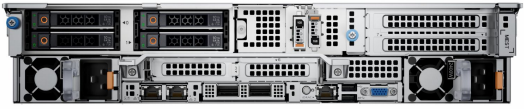
Cloud Ninjas Dell PowerEdge R7625 Network Card Upgrade Tips
-
 There are 6 different types of interfaces: RJ45, SFP+, SFP28, Fiber Channel, QSFP28, and QSFP56.
-
 There are multiple port speeds: 1GbE, 10GbE, 25GbE, 40GbE, 100GbE.
-
 Maximum port speed for the R7625 is 100GbE (Gigabits over Ethernet).
-
 The R7625 does support fibre channel cards over PCIe express.
-
The Dell PowerEdge R7625 accepts up to 2 NICs on the back panel of the chassis.